-
オリジナルのGemパッケージを展開
% cd /jekyll_root_dir
kiri@smtp:~/projects/jekyll[1133]% gem unpack agency-jekyll-theme/jekyll-theme-agency-1.1.0.gem
/usr/local/lib/ruby/site_ruby/2.7/rubygems/package.rb:509: warning: Using the last argument as keyword parameters is deprecated
Unpacked gem: '/home/kiri/projects/jekyll/jekyll-theme-agency-1.1.0'
kiri@smtp:~/projects/jekyll[1134]%
-
.gitignoreでコミットしないファイルを設定
% cd jekyll-theme-agency-1.1.0
% cat .gitignore
*.gem
*~
.bundle
.jekyll-cache
.sass-cache
_site
Gemfile.lock
%
- GitHub上でリポジトリを作成
- README.mdも含めてコンテンツは何も作らなくて良い
- ここではkmsq2c/jekyll-theme-agency
-
コミットしGitHubへプッシュ
kiri@smtp:~/projects/jekyll/custompages/openagr.org[1085]% git init
kiri@smtp:~/projects/jekyll/custompages/openagr.org[1089]% git add -A
kiri@smtp:~/projects/jekyll/custompages/openagr.org[1090]% git commit -m "first commit"
kiri@smtp:~/projects/jekyll/custompages/openagr.org[1091]% git branch -M main
kiri@smtp:~/projects/jekyll/custompages/openagr.org[1092]% git remote add origin https://github.com/kmsq2c/jekyll-theme-agency.git
kiri@smtp:~/projects/jekyll/custompages/openagr.org[1093]% git push -u origin main
kiri@smtp:~/projects/jekyll/custompages/openagr.org[1094]%
- README.mdを書き換える
- 必ずREADME.mdは,そのサイト用に書き換えておきましょう
- いずれにせよREADME.mdが無いとコミットできません
- Gemベーステーマのあるサイトをリモートテーマに設定
-
remote_themeにGemベーステーマのリポジトリパスを設定
kiri@smtp:~/projects/jekyll/custompages/openagr.org[1104]% diff -u _config.yml~ _config.yml --- _config.yml~ 2022-08-01 16:13:57.395972000 +0900 +++ _config.yml 2022-08-04 09:51:24.662300000 +0900 @@ -11,7 +11,8 @@ # You can create any custom variable you would like, and they will be accessible # in the templates via {{ site.myvariable }}. -theme: jekyll-theme-agency +#theme: jekyll-theme-agency +remote_theme: raviriley/agency-jekyll-theme url : "" # the base hostname & protocol for your site, e.g. http://example.com baseurl: "" # the subpath of your site, e.g. /blog kiri@smtp:~/projects/jekyll/custompages/openagr.org[1105]% -
.gitignoreでコミットしないファイルを設定
kiri@smtp:~/projects/jekyll/custompages/openagr.org[1108]% cat .gitignore
*.gem
*~
.bundle
.jekyll-cache
.sass-cache
_site
Gemfile.lock
kiri@smtp:~/projects/jekyll/custompages/openagr.org[1109]%
- GitHub上でリポジトリを作成
- README.mdも含めてコンテンツは何も作らなくて良い
- ここではkmsq2c/openagr
-
コミットしGitHubへプッシュ
kiri@smtp:~/projects/jekyll/custompages/openagr.org[1085]% git init
kiri@smtp:~/projects/jekyll/custompages/openagr.org[1089]% git add -A
kiri@smtp:~/projects/jekyll/custompages/openagr.org[1090]% git commit -m "first commit"
kiri@smtp:~/projects/jekyll/custompages/openagr.org[1091]% git branch -M main
kiri@smtp:~/projects/jekyll/custompages/openagr.org[1092]% git remote add origin https://github.com/kmsq2c/openagr.git
kiri@smtp:~/projects/jekyll/custompages/openagr.org[1093]% git push -u origin main
kiri@smtp:~/projects/jekyll/custompages/openagr.org[1094]%
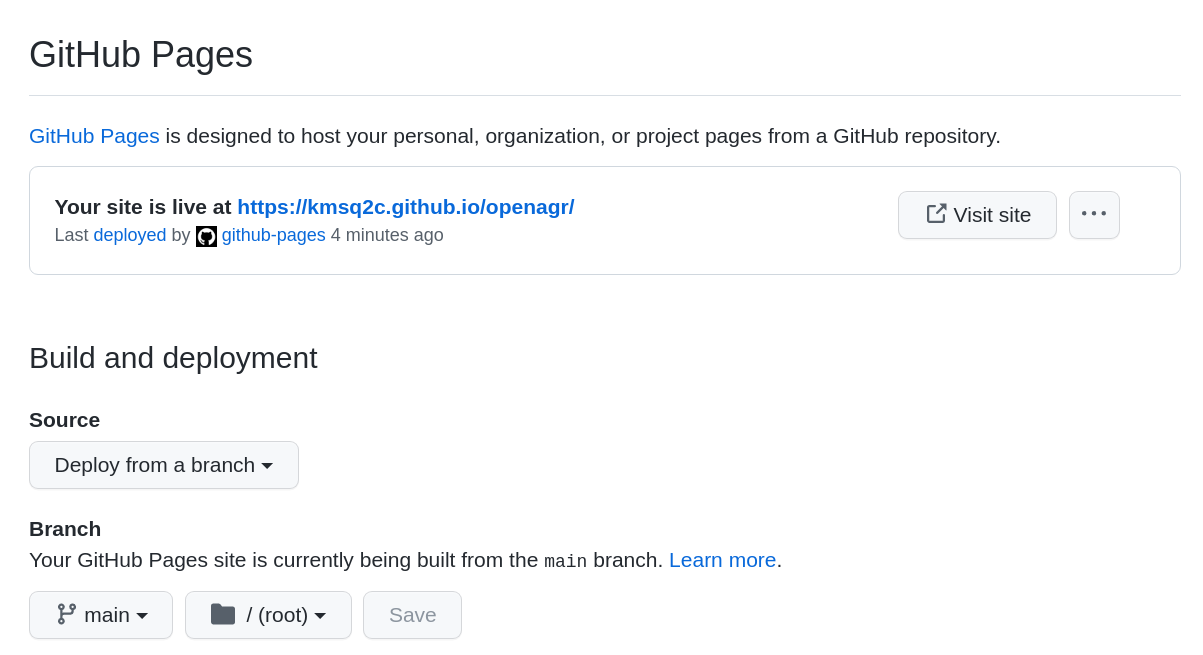
- GitPagesを作る
- Settings⇒Pages
- Source⇒"Deploy from branch"
- Branch⇒main/root⇒Save
-
サイトのURLが表示されれば成功!
-